Now that I've played around with it a bit, I feel pretty comfortable with formatting for Smashwords - and I imagine that I'll be able to transfer that knowledge to Amazon, as well. I'll give a few tips here, but I'll also try and release some sort of step-by-step guide soon (especially for OpenOffice users, who don't get enough love).
First of all and as I've mentioned before, use the nuclear option. Do not bother trying to work around all the crap modern word processors insert into your file - copy/paste it into notepad or another 'barebones' editor, and then past it back into Word or OpenOffice or whatever you use. This rids it of extraneous formatting, including italics underlines, bolded text, etc. I suggest you either go through and note where these things exist - or, even better, just do a close read after you've 'nuked' it, and decide anew where they are needed. Chances are you've italicized too much. I know I do.
A big problem with Smashwords is their improper treatment of page breaks. They don't seem to see a problem with letting your title page run into your table of contents run into your book run into your Coming Soon teaser run into your About the Author page.
I do.
I'm self-published, as are many of the people on Smashwords. We need every little trick to make us look professional because we haven't been vetted by some outside authority. Thus, the page breaks. Fortunately, and despite their own guide, there is a way to make Smashwords' Meatgrinder respect page breaks. Note: I found this at Paul Salvette's Blog. I reproduce it here for convenience.
Basically, page breaks can be made a part of a style. You can create a Heading style (I called mine "New Page Heading") that automatically inserts a page break BEFORE itself. Thus, if you make the heading of your TOC a New Page Heading, then it will appear on a new page.
The process is like so: Create a style from a copy of your normal heading style. For Word users, refer to the above link to Paul Salvette's blog post on the subject. For OpenOffice users (or, I imagine, LibreOffice users), navigate to Format->Styles and Formatting. Then click on the "Text Flow" tab.
You'll see a window like that pictured above. In the Breaks heading, check the "Insert" box. For Type select 'Page" and for Position select "Before."
There. Apply this style to your section headings, and they'll be sitting pretty on their very own pages.
I try to stick to topics like writing and publishing - but no promises. It says 'ramble' right there in the title.
Showing posts with label Smashwords. Show all posts
Wednesday, January 18, 2012
Wednesday, January 11, 2012
Smashwords Publishing First Thoughts
I've just published my first story, "Le Morte d'Arthur," on Smashwords.
Yay.
Now that I've got that out of the way, here's what I found out about the Smashwords Publishing Process:
Following the Style Guide
I had no difficulty breezing through the style guide and formatting my story. It took me about an hour and that was moving slowly because I wanted to be thorough - it should be noted, however, that I am pretty well versed with the editing software I use (OpenOffice) and the 'book' was quite short, coming out to ~2300 words with all the fixins (About the Author, preview of coming work, that kind of stuff).
One suggestion I do have for anybody formatting an eBook for the first time is the use what Smashwords terms 'the nuclear option.' This involves pasting your entire document into notepad (or a similar bare-bones editor) and then copying it back over to your normal editor. They suggest it as a last resort, but I would recommend using it at the very start, every time. Modern word processors put ridiculous amounts of junk in with your actual text, and you don't want to risk that messing up your careful styling work. Kill it with nuclear option fire.
My only other suggestion is to be sure to use line indents of 1/3 inches. I used 1/2 the first time around and it looks funny on my Nook.
Other Things You'll Need
First and foremost - and I'll be speaking on these a lot in the coming days of my career, I'm sure - is a decent book cover. I admit, I've skimped for my first story. This was more or less a trial run with a short, free eBook and I don't have much money to spare. I used GIMP to create a minimalist cover with practically nothing but text.
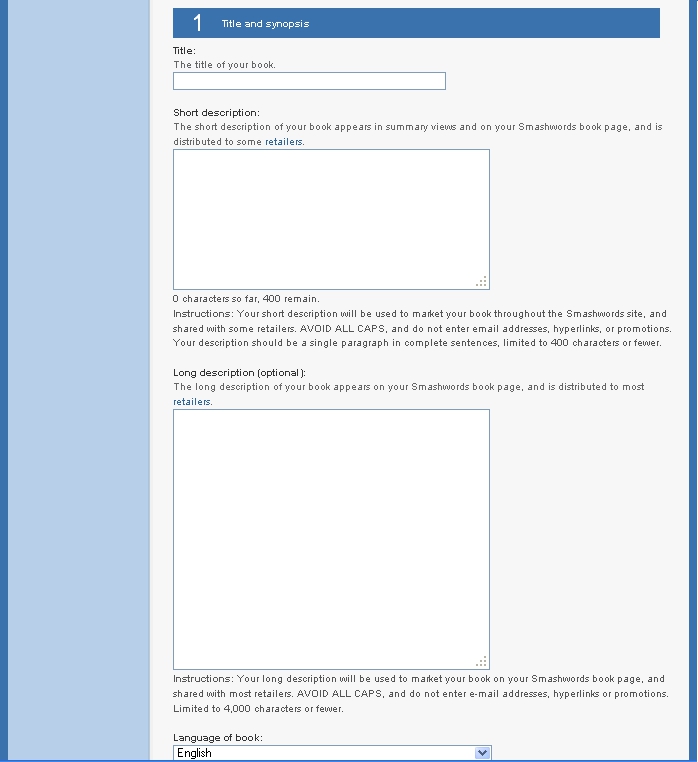
Second, synopses. One short and one long. Short one has a 400 character limit, and the long gives you up to 4k characters of space. Even in my few browses through the eBook stores, I've depending a lot on reading these to convince me whether or not to even sample a book. Work on writing tight, engaging summaries.
Third, think of the genre you'll be categorizing it in, because you need to pick one. I had trouble with that already. I consider any story without some sort of actual science speculation as fantasy, but this story was set on a spaceship. In the end I went with the more likely public opinion: Spaceship == Sci Fi.
Fourth, think of key words to link to your eBook. Smashwords gives you the ability to 'tag' it with a few. I'm not sure of the limit; I used five or six.
There is more info to give on this page, such as pricing, the formats you want your book in, etc, but I'm sure you can figure those out on your own. If not, feel free to ask about anything in the comments.
Yay.
Now that I've got that out of the way, here's what I found out about the Smashwords Publishing Process:
Following the Style Guide
I had no difficulty breezing through the style guide and formatting my story. It took me about an hour and that was moving slowly because I wanted to be thorough - it should be noted, however, that I am pretty well versed with the editing software I use (OpenOffice) and the 'book' was quite short, coming out to ~2300 words with all the fixins (About the Author, preview of coming work, that kind of stuff).
One suggestion I do have for anybody formatting an eBook for the first time is the use what Smashwords terms 'the nuclear option.' This involves pasting your entire document into notepad (or a similar bare-bones editor) and then copying it back over to your normal editor. They suggest it as a last resort, but I would recommend using it at the very start, every time. Modern word processors put ridiculous amounts of junk in with your actual text, and you don't want to risk that messing up your careful styling work. Kill it with nuclear option fire.
My only other suggestion is to be sure to use line indents of 1/3 inches. I used 1/2 the first time around and it looks funny on my Nook.
Other Things You'll Need
First and foremost - and I'll be speaking on these a lot in the coming days of my career, I'm sure - is a decent book cover. I admit, I've skimped for my first story. This was more or less a trial run with a short, free eBook and I don't have much money to spare. I used GIMP to create a minimalist cover with practically nothing but text.
Second, synopses. One short and one long. Short one has a 400 character limit, and the long gives you up to 4k characters of space. Even in my few browses through the eBook stores, I've depending a lot on reading these to convince me whether or not to even sample a book. Work on writing tight, engaging summaries.
Third, think of the genre you'll be categorizing it in, because you need to pick one. I had trouble with that already. I consider any story without some sort of actual science speculation as fantasy, but this story was set on a spaceship. In the end I went with the more likely public opinion: Spaceship == Sci Fi.
Fourth, think of key words to link to your eBook. Smashwords gives you the ability to 'tag' it with a few. I'm not sure of the limit; I used five or six.
There is more info to give on this page, such as pricing, the formats you want your book in, etc, but I'm sure you can figure those out on your own. If not, feel free to ask about anything in the comments.
Subscribe to:
Posts (Atom)